
Zum - Student Transportation
ZumMaps & Navigation
4.5466.00 Reviews
- Version
- 3.0.10
- Installs
- 100.00K
- Age Rating
- Everyone
Screenshots
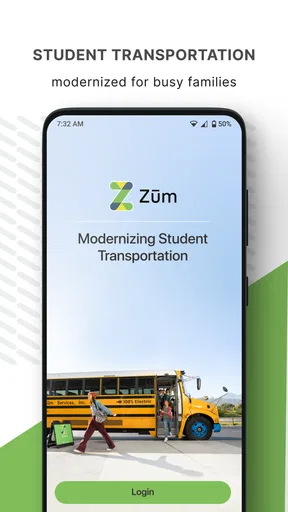
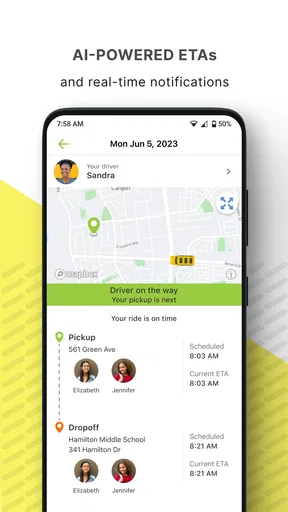
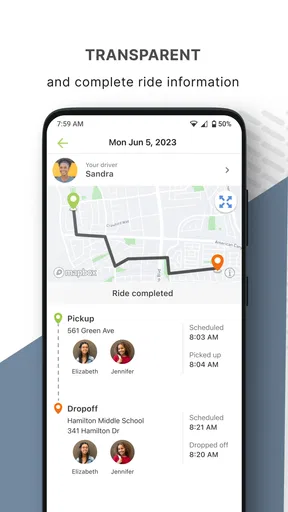
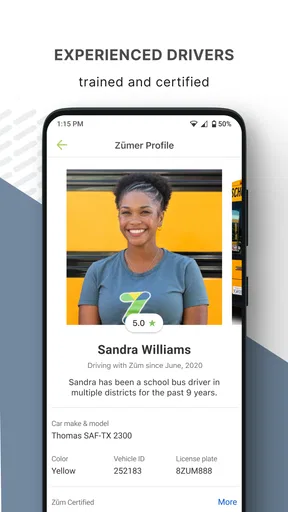
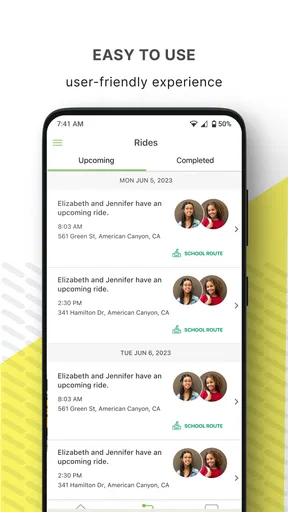
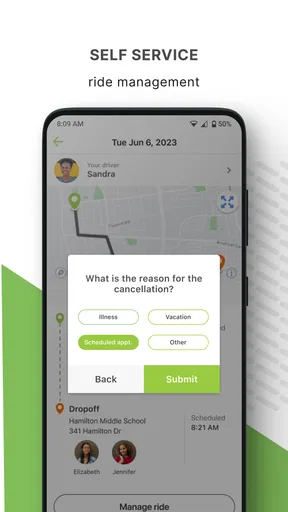
Our Review of Zum - Student Transportation
 Analysis by Appyee
Getting a child to school is one thing; knowing whether the trip is progressing as expected is another. Zum - Student Transportation is a free Maps & Navigation app from Zum that focuses on the family side of school transportation. I approached it less like a general map and more like a daily coordination tool: something to check before the morning rush, revisit when plans change, and use to reduce the number of messages needed between a parent, a child, and the ride service.
That distinction matters. This is not the app I would open to explore a city, plan a holiday route, or replace a full navigation service. Its purpose is narrower and more practical: track and manage a child’s rides. When that matches your routine, the focused design can feel reassuring. When your transportation needs are broader, the narrow focus becomes its main limitation.
How I used Zum in a normal school-day routine
My preferred workflow starts before the vehicle is expected. I open the app to check the child’s scheduled ride and use the available ride information as a reference point for the morning. That small habit is more useful than repeatedly asking, “Has the car arrived yet?” It gives the family a shared place to look instead of turning every delay or timing question into a separate conversation.
The most realistic use case is a household where school transportation is already arranged and a parent needs visibility rather than a new route-planning system. For example, imagine a child leaving on a school ride while one parent is preparing for work and another is handling a younger sibling. A quick check can help the adult decide whether to stay near the pickup point, finish breakfast, or send the child downstairs. The value is not dramatic; it is the quiet reduction of uncertainty during a busy part of the day.
I also found it helpful to treat the app as a checkpoint rather than a screen that stays open constantly. Checking too often can make a parent more anxious, especially when the ride’s progress changes slowly. A better pattern is to check around the expected pickup period, again if the child is late returning, and whenever the family receives a reason to think the schedule has changed. This makes the app part of a repeatable routine instead of another source of notifications and distraction.
Because Zum is designed around a child’s rides, the person using it should think about whose information is being followed and who needs access. In a shared-care situation, the practical question is not simply whether one parent can see a ride, but whether the adults who actually handle pickup and drop-off can use the same process. I would establish that routine before relying on the app during an urgent morning. A tracking tool is most useful when every responsible adult knows where to look and what the displayed ride status means.
The app’s strongest advantage over ordinary map applications is this context. A general map can show roads, traffic, and directions, but it does not automatically understand that the important event is a child’s school ride. Zum puts the family’s attention on the transportation task itself. That saves mental effort when the question is, “What is happening with this ride?” rather than, “How do I get from one address to another?”
At the same time, I would not confuse ride visibility with a guarantee that every part of a journey is covered. Parents still need a backup plan for a missed pickup, a dead phone, a change at school, or a child who arrives somewhere unexpected. Zum can support coordination, but it should sit alongside the school’s normal communication channels and the family’s own safety rules. The app is a useful layer, not a substitute for responsible supervision.
What I would check before depending on it
The first setup step is making sure the correct child and ride context are selected before the app becomes part of a daily habit. This sounds obvious, but family transportation often involves more than one child, different school days, or separate morning and afternoon routines. I would take a quiet moment to confirm which ride is being viewed rather than learning that distinction during a late pickup.
I would also check the phone’s basic notification and battery behavior. I am not treating these as special Zum features; they are practical conditions for any tracking app. If notifications are muted or the phone aggressively limits background activity, a parent may not notice an important update promptly. Keeping the app available and reviewing the phone’s notification settings is a sensible preparation step, especially for the adult who is not normally responsible for transportation.
Another worthwhile check is access discipline. Since the app concerns a child’s transportation, I would avoid casually sharing account access or leaving the phone unlocked in a public place. The right balance is to make access convenient for the adults who need it while keeping the child’s travel information treated as private family information. This is a habit around using the app, not a claim about a particular security control.
The app is rated for Everyone, which makes its audience broad, but that does not mean every child should manage the process independently. A younger child may only need a simple family instruction such as staying with the agreed pickup routine, while the parent handles the app. An older student may be able to communicate changes more directly. I would use Zum to support the child’s independence gradually, not to place the whole responsibility for transportation on the child.
Version 3.0.10 is the version I would look for when checking compatibility and behavior on a supported device. The minimum operating-system requirement is 9, so people using older hardware should confirm that their phone can install and run it. That requirement is modest by current standards, but school transportation often involves an older spare phone, and compatibility is worth checking before a busy term begins.
Settings and habits that make the app easier to live with
I prefer to separate settings that affect awareness from settings that affect interruption. If the phone offers notification controls for the app, I would first make sure ride-related updates are allowed, then decide how prominently they should appear. A parent who needs immediate awareness may want visible alerts, while someone who checks at fixed times may prefer fewer interruptions. The best choice depends on the family’s schedule, not on keeping every alert enabled by default.
There is also a useful distinction between checking a ride and reacting to it. I would open the app to understand the current situation, then decide what action is actually needed. If the child is already safely accounted for, there may be no reason to keep refreshing. This habit prevents the app from becoming a nervous ritual and keeps attention on decisions that matter, such as meeting the child or contacting the appropriate school or transportation contact.
For families with multiple caregivers, I would agree on a simple vocabulary outside the app: who checks the morning ride, who handles afternoon pickup, and who takes over if the usual adult is unavailable. The app can show transportation information, but it cannot assign family responsibilities by itself. A short household routine makes the information much more useful than having several people independently monitor the same ride without knowing who is acting.
I would also review the app after a change in routine. A new school term, a different pickup arrangement, or a child moving between activities can make old assumptions unreliable. Rather than trusting yesterday’s habit, I would verify the relevant ride before the first day of the new schedule. This is one of the less obvious ways to get more value from a focused app: use changes in real life as prompts to recheck the workflow.
The free price makes experimentation easy, and the age rating means it is approachable for a wide family audience. Still, “free” does not remove the need to consider whether it fits your transportation arrangement. If your child never uses a ride that the app can track or manage, installing it will not solve a problem you do not have. The right question is whether it matches the family’s existing school-transportation process.
Faster patterns for busy mornings and afternoons
Experienced use is mostly about reducing repeated decisions. I would keep Zum in a predictable place on the phone, open it from the same starting point, and check the ride at the same moments each day. That sounds simple, but consistency matters when a parent is carrying bags, preparing another child, or leaving for work. A familiar sequence is faster than searching through the phone whenever a question comes up.
A second pattern is to pair the app with a physical routine. For example, the child can prepare shoes and school items while the parent checks the ride, then move to the pickup area only when the family’s agreed timing makes sense. The app does not replace that routine; it helps the family coordinate it. This avoids the common mistake of expecting a digital status to handle every practical detail of getting a child out the door.
For the afternoon, I would make the return check part of the person’s arrival routine. If the adult is already near the home entrance or pickup location, a quick look can help them stay organized without repeatedly calling the child. If the child is expected to transition to an activity instead of going straight home, I would confirm that all adults understand the plan separately. A ride-tracking app is clearest when the destination and handoff expectations are already settled.
One useful trade-off is deciding when not to use the app. If a child is already with a trusted adult, or if the family has received a direct update from the school, opening Zum may add little. Experienced users do not measure success by how often they check; they use the app when it answers a real transportation question. That approach protects attention and makes unusual changes easier to notice.
Compared with calling the school or sending a message to another parent, the app can be faster for a basic ride-status check because it gives the family a dedicated place to look. Compared with a general map, it is more relevant to the child’s transportation context. But a phone call remains better when the issue is a missing child, a handoff problem, or an instruction that needs confirmation from a responsible person. Zum improves routine visibility; it does not replace human communication when the situation is ambiguous.
Compared with a broad family-location application, Zum may feel less useful for tracking relatives outside school transportation. That is not a flaw if your goal is specifically school rides, but it is an important buying decision. A family wanting one map for every member, every trip, and every location may prefer a broader tool. A parent who mainly wants transportation-focused awareness may appreciate not having unrelated location features competing for attention.
Where the focused design reaches its limits
The biggest limitation is scope. Zum is not the right choice if you want turn-by-turn directions for personal driving, public-transit discovery, travel planning, or a general-purpose map. Its value depends on having a child’s ride workflow that fits the service. Without that context, the app is unlikely to become a useful everyday navigation companion.
I would also be careful about treating displayed ride information as perfectly current in every circumstance. Any digital tracking experience can be affected by a changing schedule, device connectivity, delayed updates, or a last-minute transportation decision. I am not saying Zum fails in a particular way; I am saying a responsible parent should interpret an app status alongside the child’s actual situation. If something looks wrong, contact the relevant human support channel rather than repeatedly refreshing.
Another limit appears in unusual family arrangements. Shared custody, alternating pickup adults, after-school clubs, and one-off changes can make a standard daily flow harder to follow. The app may still be useful, but the family has to create a clear handoff process around it. I would not rely on a single adult’s memory of the schedule when several people may collect the child. A written household plan can be more important than any individual feature.
The app also cannot solve a communication gap between a child and the adults responsible for them. A parent may see that a ride is progressing, but still need to know whether the child has their belongings, understands the destination, or has been collected safely. Zum helps answer one part of the transportation question. It should not be presented to a child as permission to ignore agreed safety instructions or to leave a pickup location without confirmation.
For a small family with one predictable ride, the focused approach may be pleasantly simple. For a larger household, the experience will depend more heavily on careful selection and agreed routines. I would spend time learning how the app presents each child’s ride rather than assuming that a single glance always tells the whole story. This is where patient setup pays off: the more complicated the household, the more valuable a repeatable checking habit becomes.
Zum has been available since February 12, 2016, and its current version is 3.0.10. Those details make it a mature-looking choice in terms of its presence over time, while the version requirement still deserves attention on older devices. Its user response is encouraging, with a 4.5 average from around 1.2 thousand ratings and over 100 thousand installs. I see that as evidence of meaningful interest, not a reason to assume it will fit every school or family arrangement.
My verdict after fitting it into real routines
I would recommend Zum - Student Transportation to parents and caregivers whose main concern is seeing and managing a child’s school rides in one focused app. It is especially appealing when the family wants a calmer alternative to repeated calls and messages during pickup and drop-off. The free price lowers the barrier to trying it, and the Everyone rating makes it approachable for households with different ages and responsibilities.
My recommendation comes with a condition: build the habit around it before you need it urgently. Confirm the correct ride context, review phone notification behavior, agree on which adult checks the app, and keep a backup communication plan. Those steps are not flashy, but they turn a basic tracking tool into something dependable in daily life. The best results come from combining the app with clear family roles rather than expecting the screen to manage the entire journey.
I would skip it if you are looking for a complete navigation replacement or a universal family-location service. A standard map is better for driving directions, and a broader family tool may be better for tracking many kinds of movement. I would also hesitate if your child’s transportation is too irregular to establish a reliable workflow. In that case, direct communication with the school or transportation provider may be more useful than maintaining another app.
For the right household, however, the narrow purpose is exactly what makes it worthwhile. Zum keeps attention on the ride that matters, supports a repeatable morning and afternoon check, and can reduce avoidable uncertainty without demanding constant monitoring. My final view is that it works best as a calm coordination layer: useful, specific, and practical, provided the family understands its boundaries and continues to use human judgment when a ride does not go as expected.
My bottom line: choose Zum when school-ride visibility is the problem you are trying to solve, not navigation in general. Used with consistent settings, shared caregiver habits, and a sensible backup plan, it can make everyday student transportation easier to manage.
Verdict
Strengths of Zum - Student Transportation
- Real-time bus tracking helps families monitor trips more confidently.
- Parents can receive alerts about boarding, drop-off, and route changes.
- Digital student check-ins improve visibility during daily transportation.
- Route details and schedules are easy to access from one app.
- Useful communication tools connect families with schools and transport staff.
Limitations of Zum - Student Transportation
- Availability depends on the school or district using the Zum platform.
- Location updates may be delayed by weak signal or GPS issues.
- Some features require notification and location permissions to work properly.
- Parents may need separate accounts for multiple children or schools.
- App usefulness is limited outside supported Zum transportation programs.
Similar Picks in This Category
View All
Uber - Request a ride
Uber Technologies, Inc.4.7


inDrive. Rides with fair fares
® SUOL INNOVATIONS LTD4.8

Yandex Go: Taxi Food Delivery
Mikromobilnost LLC Belgrade4.8

Bolt: Request a Ride
Bolt Technology4.8

Rapido: Bike-Taxi, Auto & Cabs
Rapido Bike Taxi4.8
Frequently Asked Questions
What is Zum - Student Transportation, and who is it designed for?
Zum - Student Transportation is a school transportation platform designed to help families, schools, drivers, and administrators coordinate student rides. Parents or guardians can typically use the app to view transportation details, receive updates, follow vehicle progress when tracking is available, and manage ride-related information. Availability and features may differ depending on the school district or transportation provider using Zum.
How do I sign in and connect my child’s transportation information?
After installing the app, you generally need to sign in with the contact information registered by your school or transportation provider. In many cases, families cannot create a fully functional account independently because student and route details must be assigned by the district. If your child or ride information is missing, inaccurate, or unavailable, contact the school transportation office or Zum support rather than creating multiple accounts.
Can I track the school vehicle and receive pickup or drop-off notifications?
Zum may provide route status, estimated arrival information, vehicle tracking, and notifications, but these tools depend on the school district’s setup, the assigned route, and local service availability. Tracking should be treated as a helpful estimate rather than an exact arrival guarantee. Enable push notifications, location permissions when requested, and mobile data access so alerts can arrive reliably.
Is Zum - Student Transportation safe and suitable for managing school rides?
The app is intended to support organized school transportation by sharing ride details with authorized families and transportation personnel. However, the application does not replace adult supervision or the school’s transportation policies. Parents should review pickup and drop-off instructions, confirm approved guardians, and report unexpected route changes or safety concerns directly to the school or transportation provider as soon as possible.
Does Zum - Student Transportation work in every school district and on all devices?
Zum is not automatically available to every family or school. Its functionality depends on whether your district or transportation provider has partnered with Zum and which features they have enabled. The app generally requires a compatible Android or iOS device, an internet connection, and current account information. Before downloading, check with your school to confirm eligibility, supported services, and device requirements.
